
Types of Topologies


Network topology refer to the configuration or the manner in which the computers and Network devices are connected. The two types of Topologies are physical Topology and logical topology. The Local Area Network ( LAN ) exhibition both the types of Topologies. In addition, Network topology depends on factors such as, number of devices connected, data transfer rates, response time and cost.

1) Physical topology Represent the physical layout of devices on a network. It refers to the arrangement of the device on the network and the way they communicate with each other. The five basic physical Topologies are Bus, Star, Ring, Tree and Mesh.
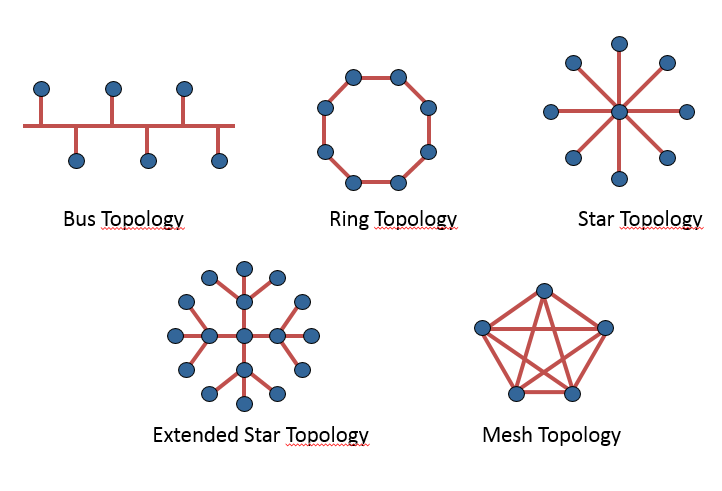
2) Logical topology Represents the way the data is transferred from one device to the next irrespective of the physical interconnection of the devices.

Comments

Popular posts from this blog

TIA/EIA 568a and 568b Wiring Color Codes

TIA/EIA-568-B.1-2001 is likely the most commonly used and talked about feature of the specification created in 1988. 568-a is the definition of pin assignments for the the pairs within Category 3 (CAT3), Category 5 (CAT5) and Category 6 (CAT6) unshielded twisted-pair (UTP) cables (eight conductor, 100-ohm balanced twisted pair cabling). The Pin/Pair assignments were named T568A and T568b, both of which define the pinout or specific order the UTP pairs need to be terminated within 8P8C (Eight Position, Eight Conductor) modular connecters, also known as RJ45 connectors. 568-A Color Code Pin #Wire Color 1-White/Green 2-Green 3-White/Orange 4-Blue 5-White/Blue 6-Orange 7-White/Brown 8-Brown 568-B Color Code Pin #Wire Color  1-White/Orange 2-Orange 3-White/Green 4-Blue 5-White/Blue 6-Green 7-White/Brown 8-Brown

What is Motherboard ?

Motherboard is a printed circuit board containing the principal components of a computer or other device, with connectors for other circuit boards to be slotted into.

What is Group Policy Management Console?

The Group Policy Management Console (GPMC) is a new and comprehensive administrative tool for Group Policy management. Prior to GPMC, administrators used property pages in various Active Directory administrative tools to manage Group Policy. For example, an administrator who wanted to implement policy for users might open the Active Directory Users and Computers snap-in, find an appropriate Organizational Unit (OU) and open its property page to access the Group Policy tab. On the Group Policy tab, the administrator might do any of a dozen or so administrative tasks, like creating Group Policy object links or manipulating their order to achieve the desired results. Whatever the tasks, when the administrator leaves the Group Policy tab, access to a visual representation of Group Policy ends and a view that focuses on Active Directory’s user and computer objects appears. GPMC integrates the existing Group Policy functionality of the property pages on the Active Directory admin...